The photo-to-dance workflow, explained

Photo to Dance Video: One Full-Body Photo In, One 12-Second Vertical Clip Out

The workflow is deliberately small. You upload one clear, full-body photo — standing, unobstructed, decent light — and the studio generates a single 12-second vertical clip of that person performing the "Looks Can Kill" hero point. There is no timeline to learn and no keyframes to set. Vertical 9:16 is the default because the trend lives on short-form feeds, so the framing is already correct before you touch anything.

The dance behind the trend is the point choreography from IVE's "Looks Can Kill," the title track of their fifth EP — the single landed 19 October 2026, the EP follows on 26 October 2026, and the release runs a "girl hero" concept. The AI version is fan-made: people post one photo, get a short clip of themselves doing the hero point. This site is independent and not affiliated with IVE or Starship; it doesn't use the official recording, video, or member likenesses.

Clips on this page are AI-generated previews. They are fictional and not a record of a real event.

Updated 20 October 2026

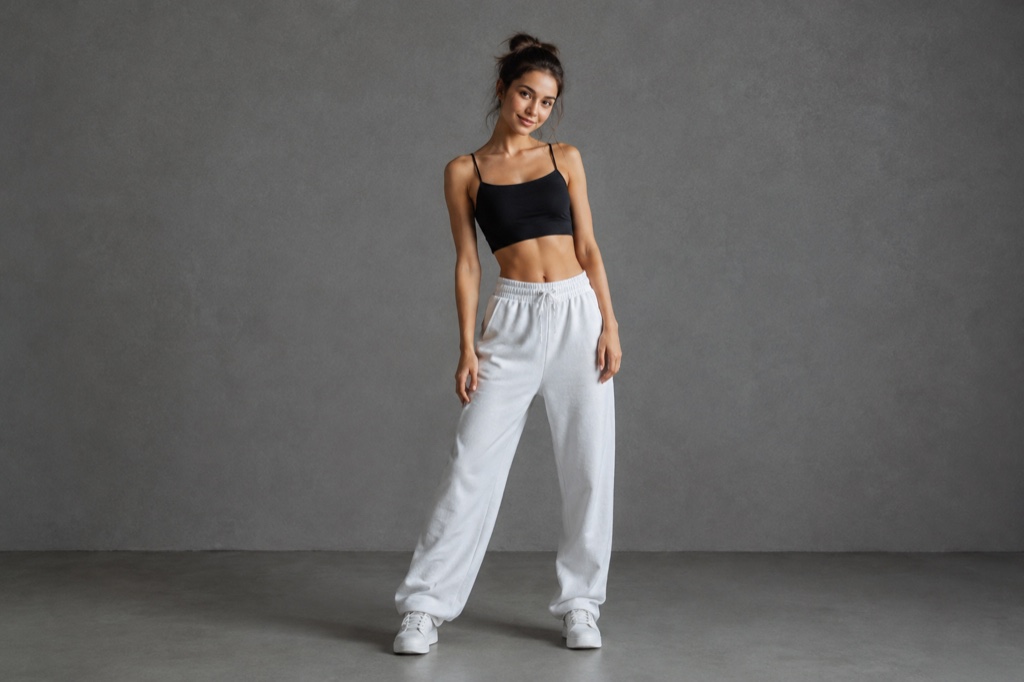
Full-body photo of a person standing in daylight, shown beside the generated 12-second vertical dance clip
Length
5–12 seconds
Resolution
480p · 720p · 1080p
Aspect ratio
9:16 · 16:9 · 1:1
Watermark
None on paid renders
Model
Seedance 2.0
Moderation
SeeAPI, fail-closed

Designed around a single photo

Most video tools want a set of images, a script, or a clip to animate. This one is built for the smallest possible input: one full-body shot where your whole body and both arms are visible. That constraint is why the result stays readable at 9:16 — the model has a clean subject to work from instead of guessing.

Twelve seconds, vertical, nothing to edit

The output is a fixed 12-second 9:16 clip, which is the length the trend actually uses on Shorts, Reels and TikTok. You don't trim, crop or add a timeline. Download it, drop it into the app, and it already fills the frame the way a phone-filmed dance would.

Credits priced per clip, refunded on failure

Credits start at $9.90. A standard 720p 12-second clip costs 35 credits, so you can work out your cost per attempt before you buy anything. If a render fails, the credits for that render are refunded — you are not charged for a clip you never received.

How it works

  1. 1

    1. Choose a full-body photo

    Pick one photo where you are standing, head to feet in frame, arms away from your torso, and lit from the front. Avoid sitting poses, group shots, heavy shadow, and anything cropped at the knees. Plain backgrounds and simple clothing give the model fewer things to misread.

  2. 2

    2. Upload it

    Drop the file into the studio. The tool reads the body pose from the photo and maps the dance motion onto it, so the clearer the pose, the cleaner the movement. If the photo is cropped or obscured, swap it before spending credits.

  3. 3

    3. Generate the 12-second clip

    Run the render. You get a vertical 9:16 clip at 720p in which the person from the photo performs the hero point choreography — finger-gun and point gestures included. Check hands and feet first; those are the usual places small artifacts show up.

  4. 4

    4. Download and post

    Save the MP4 and upload it to whichever feed you are posting to. If you want a second take from a different photo, that is a separate render and a separate 35-credit charge — there is no per-photo subscription bundled in by default.

Start from a tested prompt

Each prompt is complete: subject, scene, camera and what must not change. Copy it or open the studio with it pre-filled.

Split view of an uploaded full-body portrait and the vertical 9:16 clip of the same person doing a finger-gun hero point

Practice room

A practice room scene that keeps the face and outfit from your photo.

Prompt (English)

Use the person in the uploaded photo as the only hero. Keep their face, hair, skin tone and outfit exactly as photographed. A bright dance practice room with a mirrored wall, pale wooden floor and soft daylight. The person faces the mirror, then turns to the camera: they roll their shoulders, cross their arms near the face, snap a finger-gun point at the lens, take a quick side step, lift a bent leg and finish with an arm raised overhead. One continuous vertical 9:16 shot at full-body distance, handheld camera with a gentle push-in, clean natural light. No text, no watermark, no other people, no real celebrities, no logos.

Use in studio

Spotlight finale

A spotlight finale scene with a tighter camera and a held final pose.

Prompt (English)

Use the person in the uploaded photo as the only hero. Keep their face, hair, skin tone and outfit exactly as photographed. A dark stage with a single warm spotlight and a thin haze in the air. The person steps into the light, crosses their arms, snaps a finger-gun point at the lens, shifts through a side step, lifts a bent leg and finishes with an arm overhead and a held final pose as the light tightens on them. One continuous vertical 9:16 shot at full-body distance, slow push-in, deep shadows and warm rim light. No text, no watermark, no other people, no real celebrities, no logos.

Use in studio

Rooftop hero

A rooftop hero scene for a more graphic, stylised result.

Prompt (English)

Use the person in the uploaded photo as the only hero. Keep their face, hair, skin tone and outfit exactly as photographed. Night rooftop above a glowing city skyline, a light breeze moving their hair and jacket. The person walks two steps toward the lens, crosses their arms, snaps a finger-gun hand toward the camera, points at the lens, shifts their weight through a sharp side step, lifts one bent leg, raises an arm overhead and settles into a wide action-hero stance with one final point. One continuous vertical 9:16 shot at full-body distance, a slight low angle, cinematic teal and amber light, slow motion on the snap. No text, no watermark, no other people, no real celebrities, no logos.

Use in studio

What kind of photo actually works

The single biggest factor in output quality is the input photo, not the prompt. Shoot or pick a frame where you are standing straight, feet visible, arms slightly away from your body so the silhouette is readable. Front-on or a slight three-quarter angle both work; extreme angles and foreshortened limbs do not.

Light matters more than resolution. A phone photo in even daylight beats a 40-megapixel shot with half your face in shadow. Avoid busy backgrounds, heavy patterns, and anything that overlaps your outline — the model has to separate you from the scene before it can move you.

Crop tight enough that you fill most of the frame vertically, but leave a little headroom. A person filling 20% of a wide landscape photo gives the model very little to work with when it re-frames to 9:16.

What the clip is — and what it isn't

The output is a generated dance animation of the person in your photo performing the finger-gun and point gestures associated with the trend. It is a short, loopable-feeling vertical clip, not a full choreography breakdown, and it does not reproduce the official music video shot for shot.

No official audio is included. The site does not use IVE's recording, the official video, or any member's likeness. You are generating motion from your own photo, and you add whatever sound you have the rights to use when you post.

This is an independent fan-made tool. It is not affiliated with IVE or Starship Entertainment, and it makes no claim to be an official product of the group or label.

Cost, credits and retries

Pricing is per render, not per month. Credits start at $9.90, and a standard 720p 12-second clip is 35 credits, so a single top-up covers a predictable number of attempts. Nothing renews behind your back.

Renders that fail are refunded in credits, which means a bad server minute does not eat your balance. A render that succeeds but that you personally dislike is a normal paid attempt — that is why it pays to start with a photo that meets the checklist above.

If you are testing several photos, budget for two or three attempts rather than one. Full-body shots vary a lot, and the difference between a good input and a great one shows up in the hands and the feet.

Questions people ask

Is this an official IVE or Starship tool?

No. Looks Can Kill AI is an independent fan-made studio. It is not affiliated with, endorsed by, or connected to IVE or Starship Entertainment, and it does not use official video, the official recording, or member likenesses.

Does the video come with the song attached?

No. The render produces silent generated motion only. No official audio, recording or music video footage is included, so you add sound yourself from whatever you have the rights to use on the platform you post to.

What photo should I upload for the best result?

One clear full-body photo: standing, head to feet visible, arms slightly away from your body, even front lighting, simple background. Avoid seated poses, cropped legs, group shots and hard shadows across the face.

How much does a clip cost?

Credits start at $9.90, and a standard 720p 12-second clip costs 35 credits. Because it is credit-based rather than a subscription, you can calculate the cost of extra attempts before you spend.

Why is the clip fixed at 12 seconds and vertical?

That is the format the trend uses. Short-form feeds reward 9:16 and a length that plays out before someone scrolls. Fixing both means there is no cropping or trimming step between render and post.

What happens if a render fails?

Failed renders are refunded in credits automatically, so a technical failure does not cost you a clip. A successful render you simply don't like is treated as a normal paid attempt.

Turn your photo into a clip

Start with the preset on this page, or write your own shot. Credits are shown before you generate, and failed renders are refunded.